LLM Configuration
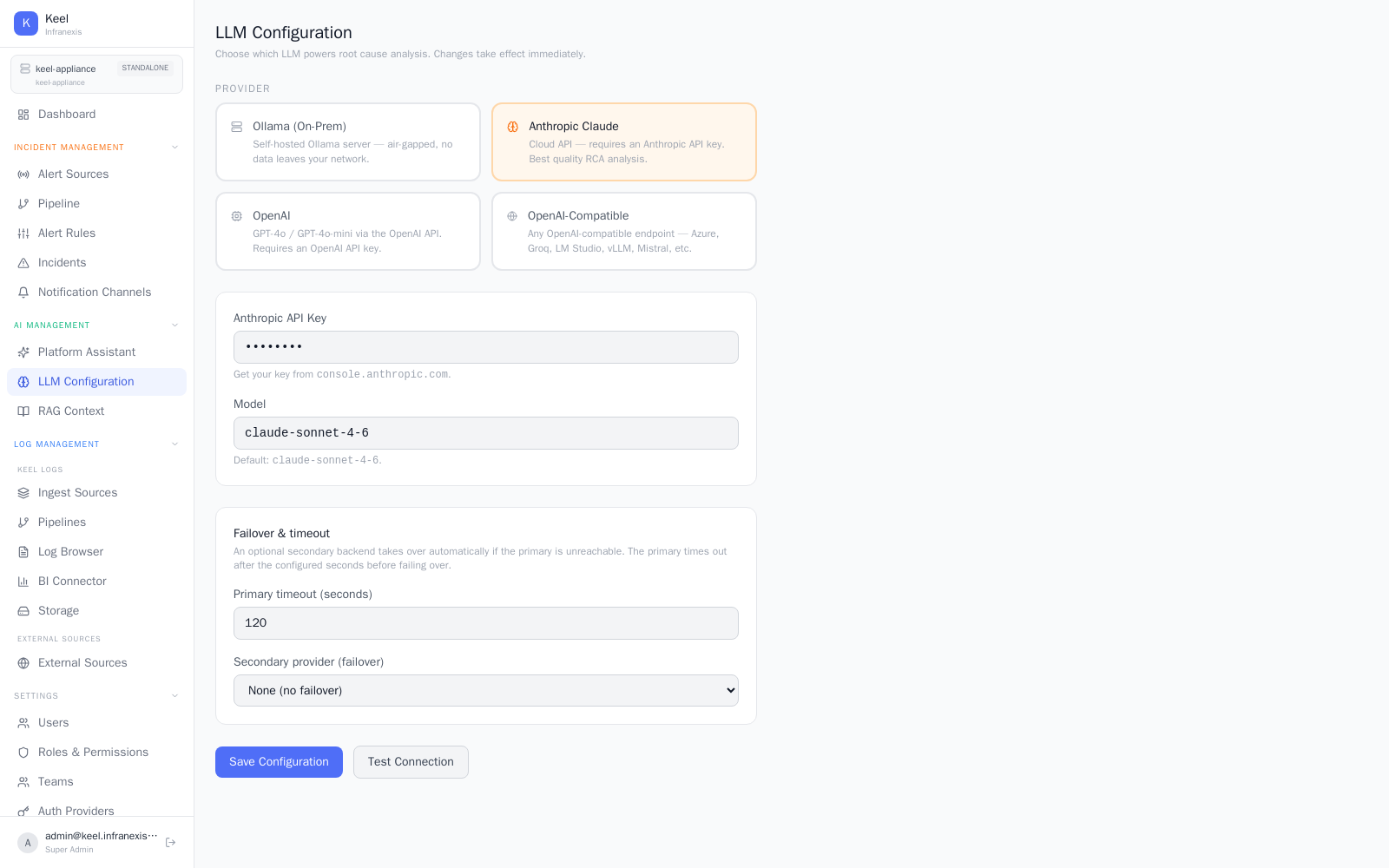
Location in Keel: /settings/ai
LLM Configuration is where you choose which model powers Keel's AI: the Platform Intelligence assistant, AI queries and Dynamic Charts, and automatic root-cause analysis. You pick a provider, set a primary backend and an optional failover, and changes take effect immediately.
Choosing a provider
Keel talks to whatever model endpoint you configure — including one that runs entirely inside your own network.
| Provider | Notes |
|---|---|
| Ollama (On-Prem) | Self-hosted Ollama server — air-gapped, nothing leaves your network. |
| Anthropic Claude | Cloud API; requires an Anthropic API key. Best-quality RCA analysis. |
| OpenAI | GPT-4o / GPT-4o-mini via the OpenAI API; requires an OpenAI API key. |
| Google Gemini | Google AI Studio (Gemini). Paste your key and pick a model — the endpoint is preconfigured. |
| OpenAI-Compatible | Any OpenAI-compatible endpoint — Azure, Groq, LM Studio, vLLM, Mistral, and others. |
For each provider you supply its key (where required) and a Model. Use Fetch from provider to list the exact models your key can access, or Enter manually to type a model name. Built-in suggestions are offered as a starting point.
Where your data goes
The log data plane — ingest, storage, search, dashboards, and incidents — runs entirely on the appliance and is never sent to Infranexis. For AI, only the context needed for a triggered request goes to the model endpoint you configured. With a local model (Ollama), nothing leaves your network at all.
Failover & timeout
An optional secondary provider (failover) takes over automatically if the primary is unreachable. The primary timeout (seconds) sets how long Keel waits on the primary before failing over. Leave the secondary set to None for no failover.
Verify before you save
Use Test Connection to confirm Keel can reach the endpoint and authenticate, then Save Configuration. If no model is reachable, the rest of the platform keeps working — you simply won't get AI answers until a model is configured.
Related
- Platform Intelligence — the assistant this model powers
- Explore & dashboards — Dynamic Charts with AI
- Incidents & root-cause analysis — RCA runs against this model
- Keel MCP Server — connect your own AI agents (read-only)